Warning: file_exists(): open_basedir restriction in effect. File(/www/wwwroot/ipeiran.com/wp-content/plugins/wp-rocket/) is not within the allowed path(s): (/www/wwwroot/new.ipeiran.com/:/tmp/) in /www/wwwroot/new.ipeiran.com/wp-content/advanced-cache.php on line 17

Deprecated: Creation of dynamic property ACF::$fields is deprecated in /www/wwwroot/new.ipeiran.com/wp-content/themes/padra/inc/acf/includes/fields.php on line 138

Deprecated: Creation of dynamic property acf_loop::$loops is deprecated in /www/wwwroot/new.ipeiran.com/wp-content/themes/padra/inc/acf/includes/loop.php on line 28

Deprecated: Creation of dynamic property ACF::$loop is deprecated in /www/wwwroot/new.ipeiran.com/wp-content/themes/padra/inc/acf/includes/loop.php on line 269

Deprecated: Creation of dynamic property ACF::$revisions is deprecated in /www/wwwroot/new.ipeiran.com/wp-content/themes/padra/inc/acf/includes/revisions.php on line 397

Deprecated: Creation of dynamic property acf_validation::$errors is deprecated in /www/wwwroot/new.ipeiran.com/wp-content/themes/padra/inc/acf/includes/validation.php on line 28

Deprecated: Creation of dynamic property ACF::$validation is deprecated in /www/wwwroot/new.ipeiran.com/wp-content/themes/padra/inc/acf/includes/validation.php on line 214

Deprecated: Creation of dynamic property acf_form_customizer::$preview_values is deprecated in /www/wwwroot/new.ipeiran.com/wp-content/themes/padra/inc/acf/includes/forms/form-customizer.php on line 28

Deprecated: Creation of dynamic property acf_form_customizer::$preview_fields is deprecated in /www/wwwroot/new.ipeiran.com/wp-content/themes/padra/inc/acf/includes/forms/form-customizer.php on line 29

Deprecated: Creation of dynamic property acf_form_customizer::$preview_errors is deprecated in /www/wwwroot/new.ipeiran.com/wp-content/themes/padra/inc/acf/includes/forms/form-customizer.php on line 30

Deprecated: Creation of dynamic property ACF::$form_front is deprecated in /www/wwwroot/new.ipeiran.com/wp-content/themes/padra/inc/acf/includes/forms/form-front.php on line 598

Deprecated: Creation of dynamic property acf_form_widget::$preview_values is deprecated in /www/wwwroot/new.ipeiran.com/wp-content/themes/padra/inc/acf/includes/forms/form-widget.php on line 34

Deprecated: Creation of dynamic property acf_form_widget::$preview_reference is deprecated in /www/wwwroot/new.ipeiran.com/wp-content/themes/padra/inc/acf/includes/forms/form-widget.php on line 35

Deprecated: Creation of dynamic property acf_form_widget::$preview_errors is deprecated in /www/wwwroot/new.ipeiran.com/wp-content/themes/padra/inc/acf/includes/forms/form-widget.php on line 36

Deprecated: Creation of dynamic property acf_field_oembed::$width is deprecated in /www/wwwroot/new.ipeiran.com/wp-content/themes/padra/inc/acf/includes/fields/class-acf-field-oembed.php on line 31

Deprecated: Creation of dynamic property acf_field_oembed::$height is deprecated in /www/wwwroot/new.ipeiran.com/wp-content/themes/padra/inc/acf/includes/fields/class-acf-field-oembed.php on line 32

Deprecated: Creation of dynamic property acf_field_google_map::$default_values is deprecated in /www/wwwroot/new.ipeiran.com/wp-content/themes/padra/inc/acf/includes/fields/class-acf-field-google-map.php on line 33

Deprecated: Creation of dynamic property acf_field__group::$have_rows is deprecated in /www/wwwroot/new.ipeiran.com/wp-content/themes/padra/inc/acf/includes/fields/class-acf-field-group.php on line 31

Deprecated: Creation of dynamic property acf_field_clone::$cloning is deprecated in /www/wwwroot/new.ipeiran.com/wp-content/themes/padra/inc/acf/pro/fields/class-acf-field-clone.php on line 34

Deprecated: Creation of dynamic property acf_field_clone::$have_rows is deprecated in /www/wwwroot/new.ipeiran.com/wp-content/themes/padra/inc/acf/pro/fields/class-acf-field-clone.php on line 35

Warning: Cannot modify header information - headers already sent by (output started at /www/wwwroot/new.ipeiran.com/wp-content/themes/padra/inc/acf/pro/fields/class-acf-field-clone.php:34) in /www/wwwroot/new.ipeiran.com/wp-includes/feed-rss2.php on line 8
IKEV2 – آی پی ایران https://new.ipeiran.com وی پی ان با آی پی ایران ip iran Fri, 27 Jun 2025 12:25:29 +0000 fa-IR hourly 1 https://wordpress.org/?v=6.2.10 https://new.ipeiran.com/wp-content/uploads/2023/06/cropped-image-1-32x32.png IKEV2 – آی پی ایران https://new.ipeiran.com 32 32 ساخت کانکشن ikev2 در اندروید 9 به بالا https://new.ipeiran.com/%d8%b3%d8%a7%d8%ae%d8%aa-%da%a9%d8%a7%d9%86%da%a9%d8%b4%d9%86-ikev2-%d8%af%d8%b1-%d8%a7%d9%86%d8%af%d8%b1%d9%88%db%8c%d8%af-9-%d8%a8%d9%87-%d8%a8%d8%a7%d9%84%d8%a7/ https://new.ipeiran.com/%d8%b3%d8%a7%d8%ae%d8%aa-%da%a9%d8%a7%d9%86%da%a9%d8%b4%d9%86-ikev2-%d8%af%d8%b1-%d8%a7%d9%86%d8%af%d8%b1%d9%88%db%8c%d8%af-9-%d8%a8%d9%87-%d8%a8%d8%a7%d9%84%d8%a7/#respond Sun, 08 Jun 2025 22:08:51 +0000 http://new.ipeiran.com/?p=3725 ایجاد اتصال ikev2  در اندورید 9 به بالا

ابتدا باید فایل CA  مربوط به سرور را دانلود ونصب بفرمایید

در سیستم اتصالات جدید وی پی ان در اندروید شما می بایست سرتیفیکت سرور ها را داشته باشید تا کلید مجوز دسترسی را داشته باشید در اندروید برخلاف ios  شما باید کلید اتصال را داشته باشید تا مجوز اتصال را داشته باشید برای همین موضوع حداقل یک فایل برای دسترسی به سرور نیاز خواهد بود

دانلود CA

دانلود CA

پس از دانلود سرتیفیکت نوبت به نصب آن می رسد وارد تنظیمات گوشی شوید

گام اول : از نوار جستجو CA   را جستجو نمایید

گام دوم: CA certificate  را انتخاب نمایید
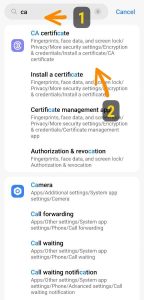
پیدا کردن قسمت CA در اندروید

گزینه CA certificate  را انتخاب نمایید
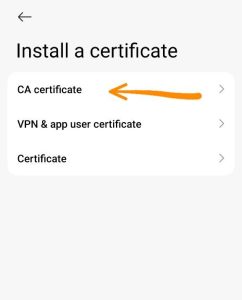
انتخاب CA certificate


در این مرحله به شما اطلاع داده می شود این سرتیفیکت برای اهداف مختلفی مانند سایتها اپها و وی پی ان برای کدگذاری ارتباطات مورد استفاده قرار میگرد و با نصب این فایل شما دسترسی برای بازگشایی رمزگذاری ارتباط را خواهید داد یعنی ما می توانیم نام کاربری و رمز عبور اکانت وی پی ان شما را مشاهده نماییم  ( این امر برای تشخیص کاربران هست که کدام کاربر وارد می شود و آیا رمز صحیح وارد نموده است؟ install anyway  را بزنید

حال از شما تاییدیه میخواهد که مجوز نصب بدهید

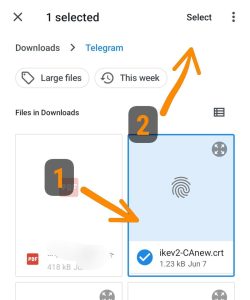
پس از تایید باید به جایی که فایل ذخیره شده است بروید پوشه دانلودها یا تلگرام اگر فایل را پشتیبان گرفته باشید فایل هست

برای راحتی پیدا شدن سه نقطه کنار صفحه را بزنید و بعدترتیب نمایش فایلها را انتخاب نمایید:
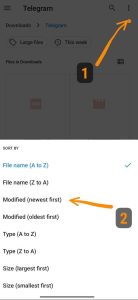
نحوه سوت فایلها

حال فایل دریافتی را انتخاب نمایید:

نصب با موفقیت انجام شد!

حال به صفحه اصلی تنظیمات بروید و گزینه vpn  را انتخاب کنید
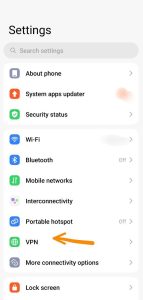
 

گزینه add vpn  در این صفحه پیدا کنید معمولا پایین یا در منو سه نقطه ای بالای صفحه هست
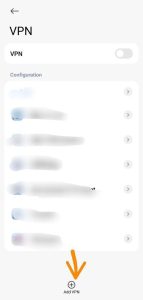
 

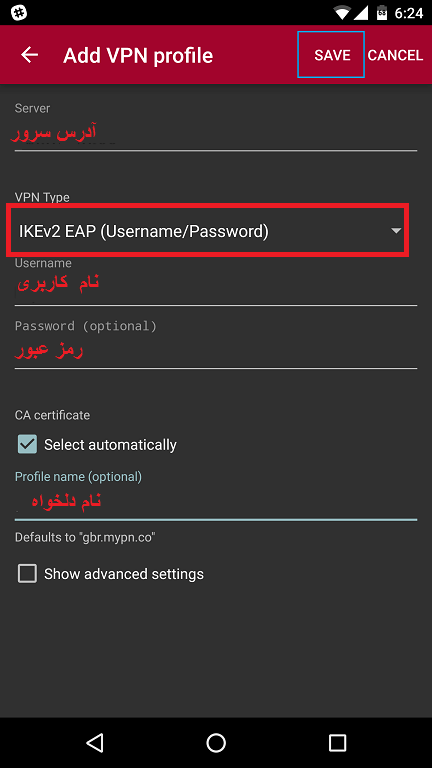
فرم را مطابق تصویر تکمیل نمایید: نکته هیچ یک از اطلاعات زیر دلخواه شما نیست همگی را باید در هنگام خرید دریافت نمایید
آدرس سرور هم انتخابی نیست باید ir10.ipeiran.com  وارد نمایید
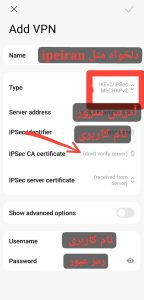
پس از پر کردن مشخصات روی قسمتی که فلش دارد ضربه بزنید  و سرتیفیکیتی که در پیشتر به گوشی داده اید را انتخاب نمایید:
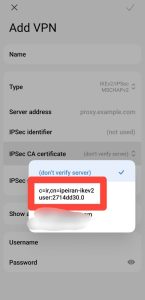
 

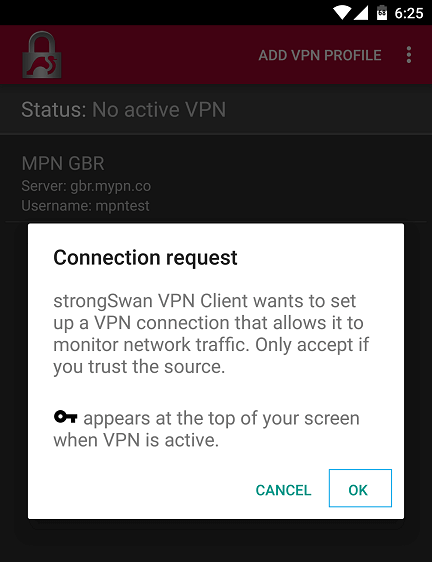
بعد از انتخاب فایل تیک بالای صفحه را بزنید گزینه ساخته شده در گوشی فایل مشاهده خواهد بود حال دکمه اتصال را بزنید و از ای پی ایران خود استفاده نمایید و در پایان آن را قطع نمایید
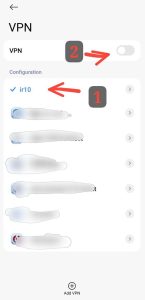
]]>
https://new.ipeiran.com/%d8%b3%d8%a7%d8%ae%d8%aa-%da%a9%d8%a7%d9%86%da%a9%d8%b4%d9%86-ikev2-%d8%af%d8%b1-%d8%a7%d9%86%d8%af%d8%b1%d9%88%db%8c%d8%af-9-%d8%a8%d9%87-%d8%a8%d8%a7%d9%84%d8%a7/feed/ 0
اتصال IKEV2 ویندوز https://new.ipeiran.com/connection-ikev2-windows/ https://new.ipeiran.com/connection-ikev2-windows/#respond Wed, 31 May 2023 23:54:44 +0000 http://new.ipeiran.com/?p=1647 /*! elementor - v3.13.3 - 28-05-2023 */ .elementor-heading-title{padding:0;margin:0;line-height:1}.elementor-widget-heading .elementor-heading-title[class*=elementor-size-]>a{color:inherit;font-size:inherit;line-height:inherit}.elementor-widget-heading .elementor-heading-title.elementor-size-small{font-size:15px}.elementor-widget-heading .elementor-heading-title.elementor-size-medium{font-size:19px}.elementor-widget-heading .elementor-heading-title.elementor-size-large{font-size:29px}.elementor-widget-heading .elementor-heading-title.elementor-size-xl{font-size:39px}.elementor-widget-heading .elementor-heading-title.elementor-size-xxl{font-size:59px}

اتصال ویندوز از طریق IKEV2

برای ساخت کانکشن IKEV2 در ویندوز ابتدا رو گزینه نتورک پایین صفحه را بزنید گزینه نتورک ستینگ رو بزنید
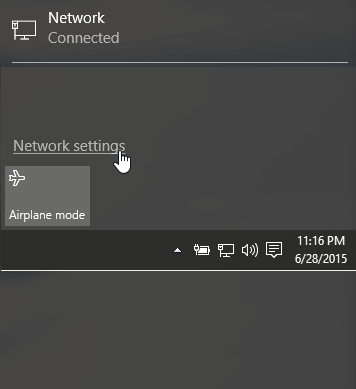
گزینه وی پی ان و بعد اضافه کردن رو بزنید
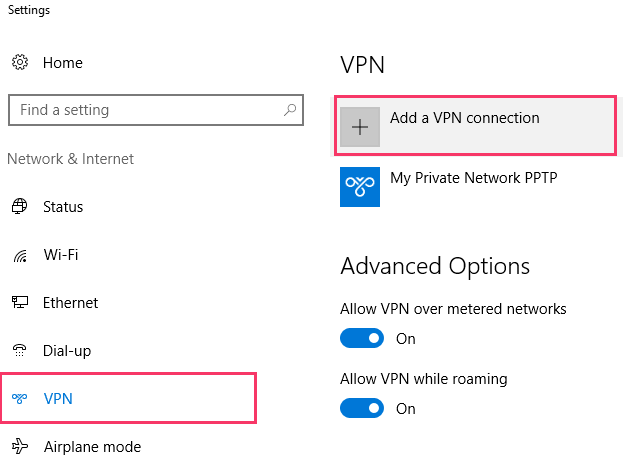
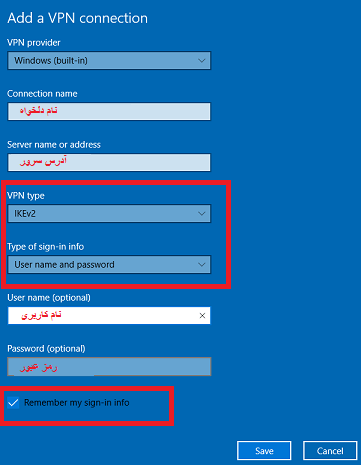
ذخیره را بزنید و با کانکشن ساخته شده متصل شوید

]]>
https://new.ipeiran.com/connection-ikev2-windows/feed/ 0
ساخت کانکشن IKEV2 اندروید https://new.ipeiran.com/creat-android-ikev2-connection/ https://new.ipeiran.com/creat-android-ikev2-connection/#respond Wed, 31 May 2023 23:04:18 +0000 http://new.ipeiran.com/?p=1638 /*! elementor - v3.13.3 - 28-05-2023 */ .elementor-heading-title{padding:0;margin:0;line-height:1}.elementor-widget-heading .elementor-heading-title[class*=elementor-size-]>a{color:inherit;font-size:inherit;line-height:inherit}.elementor-widget-heading .elementor-heading-title.elementor-size-small{font-size:15px}.elementor-widget-heading .elementor-heading-title.elementor-size-medium{font-size:19px}.elementor-widget-heading .elementor-heading-title.elementor-size-large{font-size:29px}.elementor-widget-heading .elementor-heading-title.elementor-size-xl{font-size:39px}.elementor-widget-heading .elementor-heading-title.elementor-size-xxl{font-size:59px}

اتصال IKEV2 در اندروید

این پرتوکل جدید ترین پرتوکل و ایمنترین هست و پرتوکل  IKEV2 EAP باید گوشی شما از این پروتوکل پشتیبانی کند.

در اندروید هرنسخه و نسخه هرشرکتی ممکن هست تفاوتهایی داشته باشند ولی اغلب گوشی های اندروید EAP رو ساپورت نمیکنند

برای ایجاد کانکشن نیاز به نصب برنامه خاصی ندارید باید به تنظیمات گوشی بروید:

Settings > Connections > More connection settings > VPN

یا

Settings > Wireless & networks > VPN

در گوشی با زبان فارسی: 

تنظیمات > اتصالات > تنظیمات بیشتر اتصالات > VPN

یا

تنظیمات > اتصلات بیشیم و تنظیمات بیشتر  > VPN

یا در سرچ بالای ستینگ VPN را سرچ کنید وکنترل نمایید که این پروتوکل (IKEV2/ EAP) را پشتیبانی میکند یا خیر

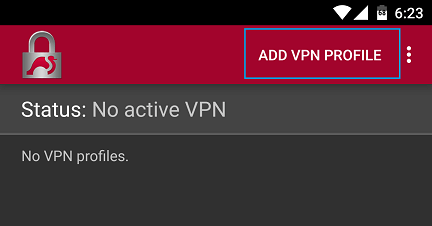
مبنای ما این هست که پشتیبانی نشود.برای همین برنامه لازم برای این پرتوکل را قرار میدهیم

دانلود


]]>
https://new.ipeiran.com/creat-android-ikev2-connection/feed/ 0
اتصال IKEV2 گوشی های آیفون https://new.ipeiran.com/ios-ikev2-connection/ https://new.ipeiran.com/ios-ikev2-connection/#respond Wed, 31 May 2023 19:47:01 +0000 http://new.ipeiran.com/?p=1632 /*! elementor - v3.13.3 - 28-05-2023 */ .elementor-heading-title{padding:0;margin:0;line-height:1}.elementor-widget-heading .elementor-heading-title[class*=elementor-size-]>a{color:inherit;font-size:inherit;line-height:inherit}.elementor-widget-heading .elementor-heading-title.elementor-size-small{font-size:15px}.elementor-widget-heading .elementor-heading-title.elementor-size-medium{font-size:19px}.elementor-widget-heading .elementor-heading-title.elementor-size-large{font-size:29px}.elementor-widget-heading .elementor-heading-title.elementor-size-xl{font-size:39px}.elementor-widget-heading .elementor-heading-title.elementor-size-xxl{font-size:59px}

اتصال گوشی های آیفون از طریق IKEV2

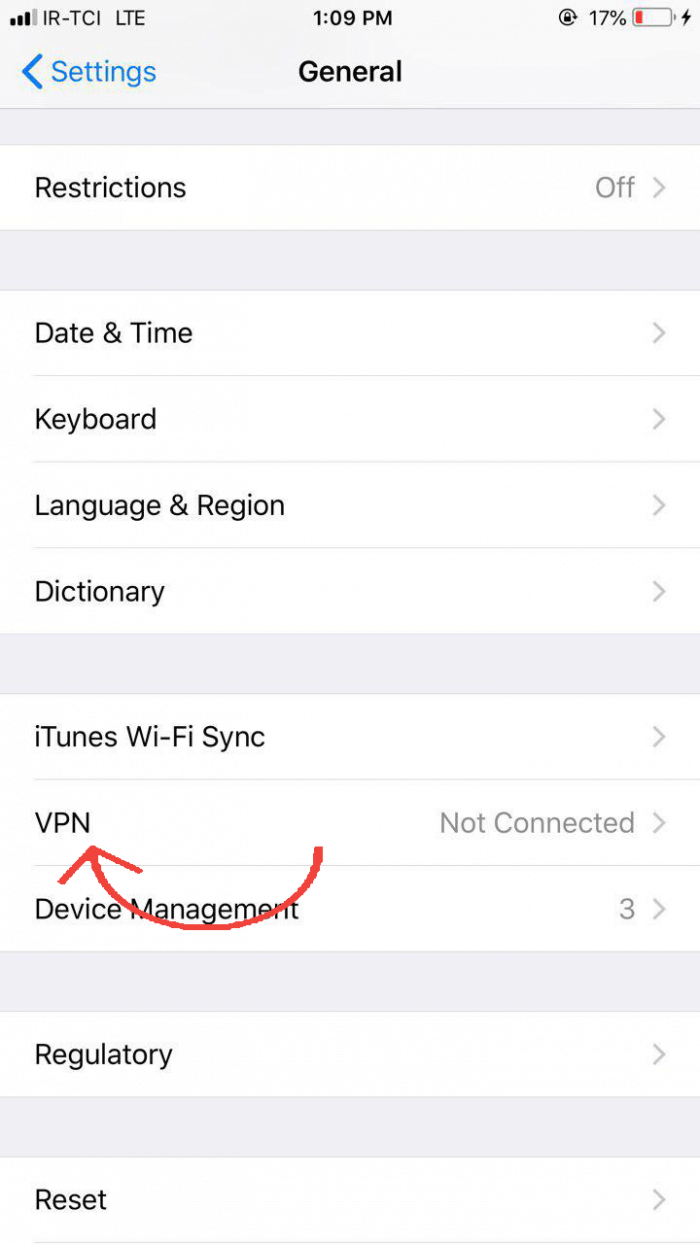
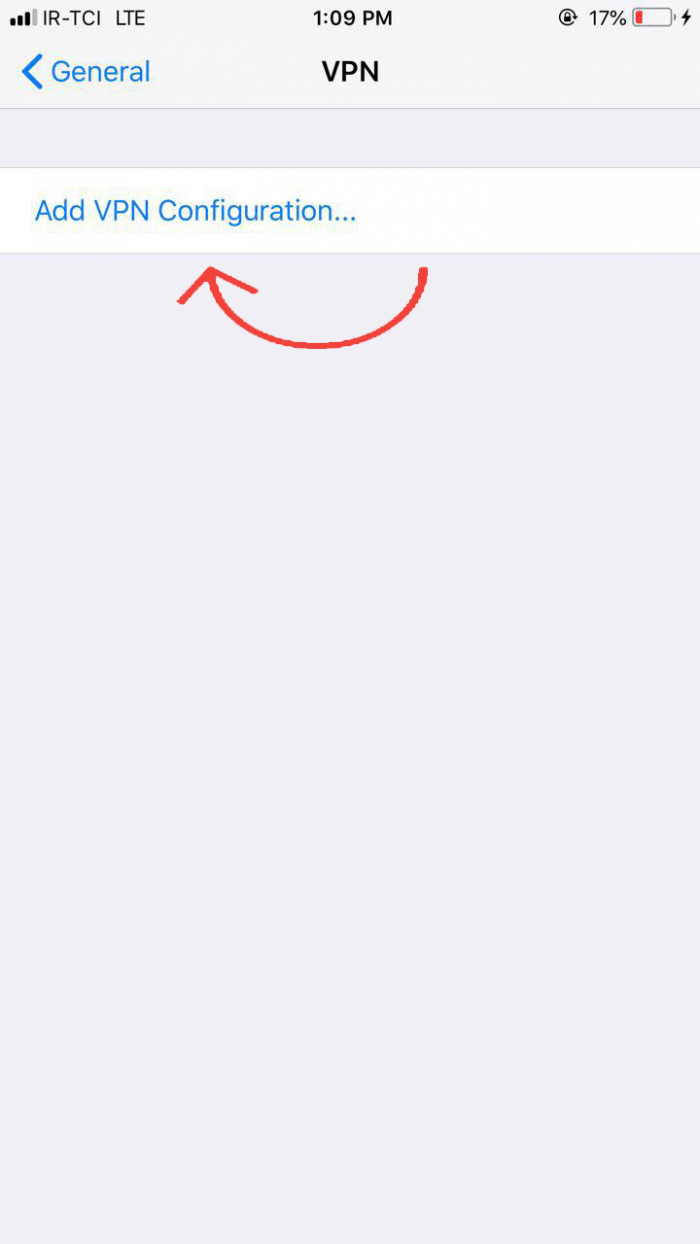
برای ساخت کانکشن IKEV2 در گوشی های آیفون و آیپدها مراحل زیر را انجام دهید

گام اول:

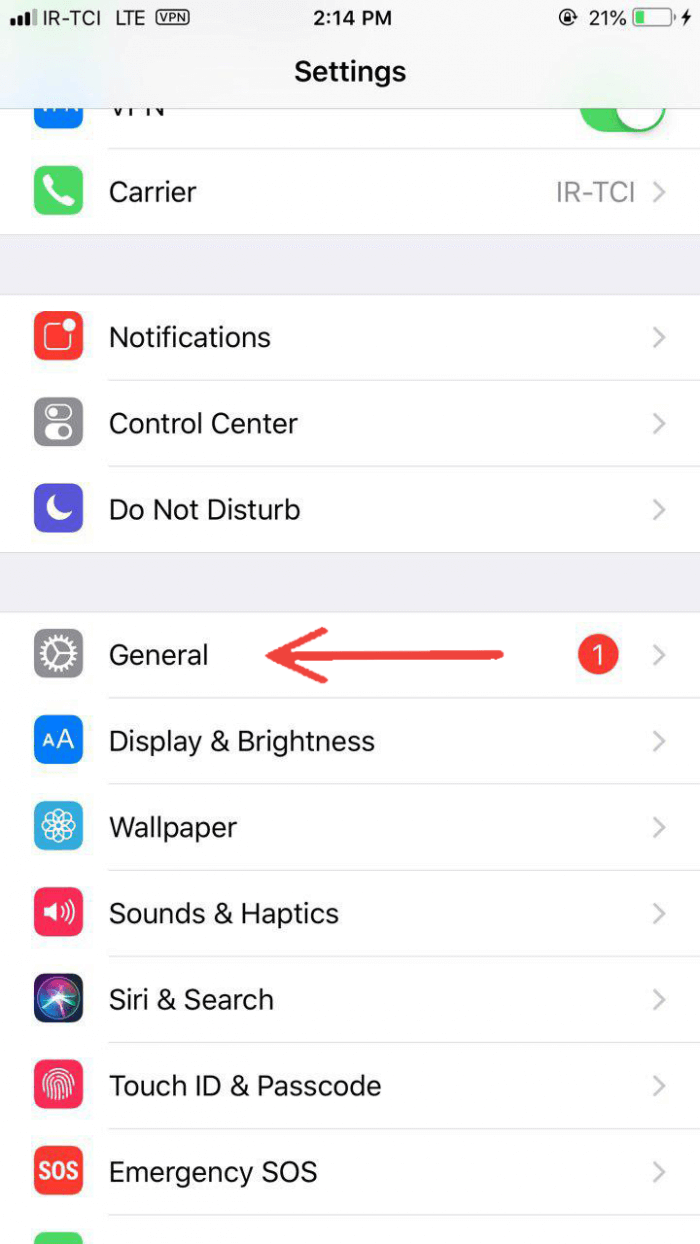
Setting>>General>VPN>>Add VPN Configuration


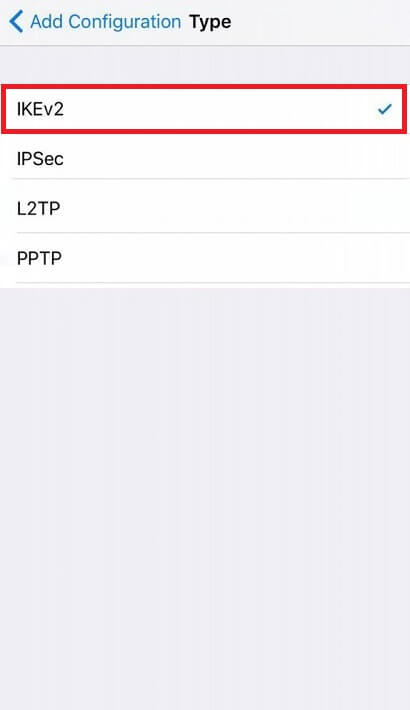
گام دوم :

نوع کانکشن رو IKEV2 انتخاب کنید
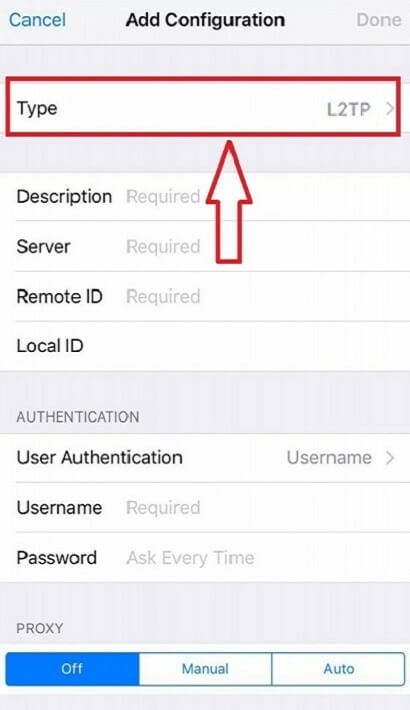

گام سوم :

مشخصات را تکمیل کنید و درپایان دکمه done بالا را بزنید بعد از انجام به صفحه قبل بر میگردید
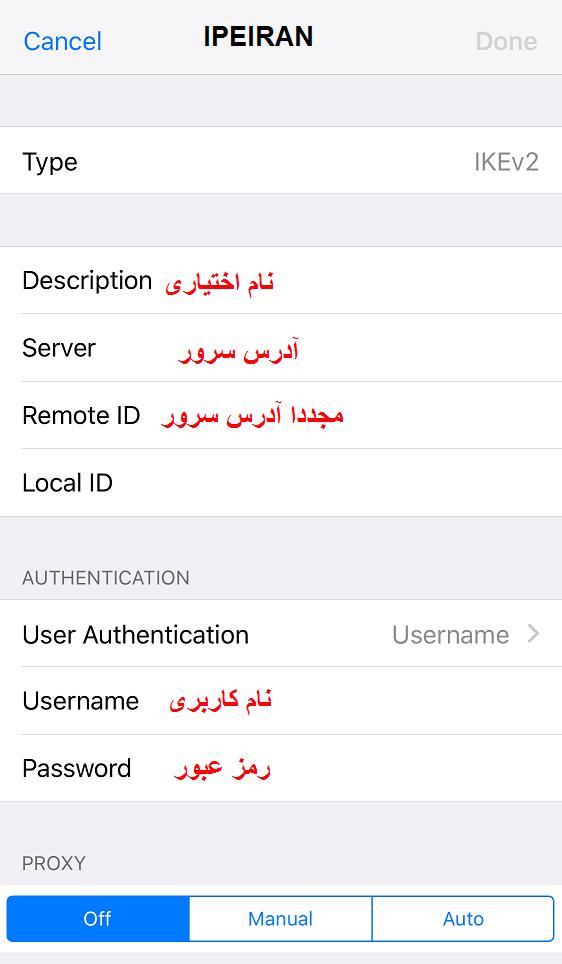
گام چهارم :

اگر چند کانکشن دارید دقت کنید تیک جلوی کانکشن مدنظر باشد دکمه کانکت بالا را بزنید و تمام 
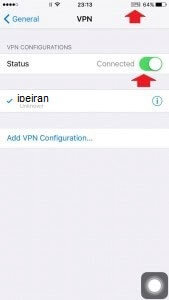
]]>
https://new.ipeiran.com/ios-ikev2-connection/feed/ 0