Warning: file_exists(): open_basedir restriction in effect. File(/www/wwwroot/ipeiran.com/wp-content/plugins/wp-rocket/) is not within the allowed path(s): (/www/wwwroot/new.ipeiran.com/:/tmp/) in /www/wwwroot/new.ipeiran.com/wp-content/advanced-cache.php on line 17

Deprecated: Creation of dynamic property ACF::$fields is deprecated in /www/wwwroot/new.ipeiran.com/wp-content/themes/padra/inc/acf/includes/fields.php on line 138

Deprecated: Creation of dynamic property acf_loop::$loops is deprecated in /www/wwwroot/new.ipeiran.com/wp-content/themes/padra/inc/acf/includes/loop.php on line 28

Deprecated: Creation of dynamic property ACF::$loop is deprecated in /www/wwwroot/new.ipeiran.com/wp-content/themes/padra/inc/acf/includes/loop.php on line 269

Deprecated: Creation of dynamic property ACF::$revisions is deprecated in /www/wwwroot/new.ipeiran.com/wp-content/themes/padra/inc/acf/includes/revisions.php on line 397

Deprecated: Creation of dynamic property acf_validation::$errors is deprecated in /www/wwwroot/new.ipeiran.com/wp-content/themes/padra/inc/acf/includes/validation.php on line 28

Deprecated: Creation of dynamic property ACF::$validation is deprecated in /www/wwwroot/new.ipeiran.com/wp-content/themes/padra/inc/acf/includes/validation.php on line 214

Deprecated: Creation of dynamic property acf_form_customizer::$preview_values is deprecated in /www/wwwroot/new.ipeiran.com/wp-content/themes/padra/inc/acf/includes/forms/form-customizer.php on line 28

Deprecated: Creation of dynamic property acf_form_customizer::$preview_fields is deprecated in /www/wwwroot/new.ipeiran.com/wp-content/themes/padra/inc/acf/includes/forms/form-customizer.php on line 29

Deprecated: Creation of dynamic property acf_form_customizer::$preview_errors is deprecated in /www/wwwroot/new.ipeiran.com/wp-content/themes/padra/inc/acf/includes/forms/form-customizer.php on line 30

Deprecated: Creation of dynamic property ACF::$form_front is deprecated in /www/wwwroot/new.ipeiran.com/wp-content/themes/padra/inc/acf/includes/forms/form-front.php on line 598

Deprecated: Creation of dynamic property acf_form_widget::$preview_values is deprecated in /www/wwwroot/new.ipeiran.com/wp-content/themes/padra/inc/acf/includes/forms/form-widget.php on line 34

Deprecated: Creation of dynamic property acf_form_widget::$preview_reference is deprecated in /www/wwwroot/new.ipeiran.com/wp-content/themes/padra/inc/acf/includes/forms/form-widget.php on line 35

Deprecated: Creation of dynamic property acf_form_widget::$preview_errors is deprecated in /www/wwwroot/new.ipeiran.com/wp-content/themes/padra/inc/acf/includes/forms/form-widget.php on line 36

Deprecated: Creation of dynamic property acf_field_oembed::$width is deprecated in /www/wwwroot/new.ipeiran.com/wp-content/themes/padra/inc/acf/includes/fields/class-acf-field-oembed.php on line 31

Deprecated: Creation of dynamic property acf_field_oembed::$height is deprecated in /www/wwwroot/new.ipeiran.com/wp-content/themes/padra/inc/acf/includes/fields/class-acf-field-oembed.php on line 32

Deprecated: Creation of dynamic property acf_field_google_map::$default_values is deprecated in /www/wwwroot/new.ipeiran.com/wp-content/themes/padra/inc/acf/includes/fields/class-acf-field-google-map.php on line 33

Deprecated: Creation of dynamic property acf_field__group::$have_rows is deprecated in /www/wwwroot/new.ipeiran.com/wp-content/themes/padra/inc/acf/includes/fields/class-acf-field-group.php on line 31

Deprecated: Creation of dynamic property acf_field_clone::$cloning is deprecated in /www/wwwroot/new.ipeiran.com/wp-content/themes/padra/inc/acf/pro/fields/class-acf-field-clone.php on line 34

Deprecated: Creation of dynamic property acf_field_clone::$have_rows is deprecated in /www/wwwroot/new.ipeiran.com/wp-content/themes/padra/inc/acf/pro/fields/class-acf-field-clone.php on line 35

Warning: Cannot modify header information - headers already sent by (output started at /www/wwwroot/new.ipeiran.com/wp-content/themes/padra/inc/acf/pro/fields/class-acf-field-clone.php:34) in /www/wwwroot/new.ipeiran.com/wp-includes/feed-rss2.php on line 8
ویندوز – آی پی ایران https://new.ipeiran.com وی پی ان با آی پی ایران ip iran Mon, 13 May 2024 10:48:50 +0000 fa-IR hourly 1 https://wordpress.org/?v=6.2.10 https://new.ipeiran.com/wp-content/uploads/2023/06/cropped-image-1-32x32.png ویندوز – آی پی ایران https://new.ipeiran.com 32 32 اتصال pptp ویندوز https://new.ipeiran.com/pptp-connection-windows/ https://new.ipeiran.com/pptp-connection-windows/#respond Mon, 12 Jun 2023 22:09:40 +0000 http://new.ipeiran.com/?p=1888 /*! elementor - v3.13.3 - 28-05-2023 */ .elementor-heading-title{padding:0;margin:0;line-height:1}.elementor-widget-heading .elementor-heading-title[class*=elementor-size-]>a{color:inherit;font-size:inherit;line-height:inherit}.elementor-widget-heading .elementor-heading-title.elementor-size-small{font-size:15px}.elementor-widget-heading .elementor-heading-title.elementor-size-medium{font-size:19px}.elementor-widget-heading .elementor-heading-title.elementor-size-large{font-size:29px}.elementor-widget-heading .elementor-heading-title.elementor-size-xl{font-size:39px}.elementor-widget-heading .elementor-heading-title.elementor-size-xxl{font-size:59px}

اتصال ویندوز از طریق pptp

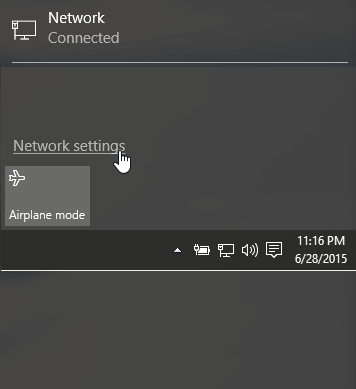
برای ساخت کانکشن pptp در ویندوز ابتدا رو گزینه نتورک پایین صفحه را بزنید گزینه نتورک ستینگ رو بزنید
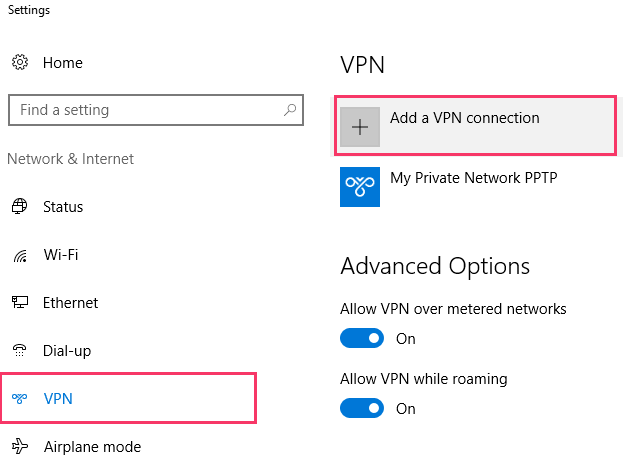
گزینه وی پی ان و بعد اضافه کردن رو بزنید
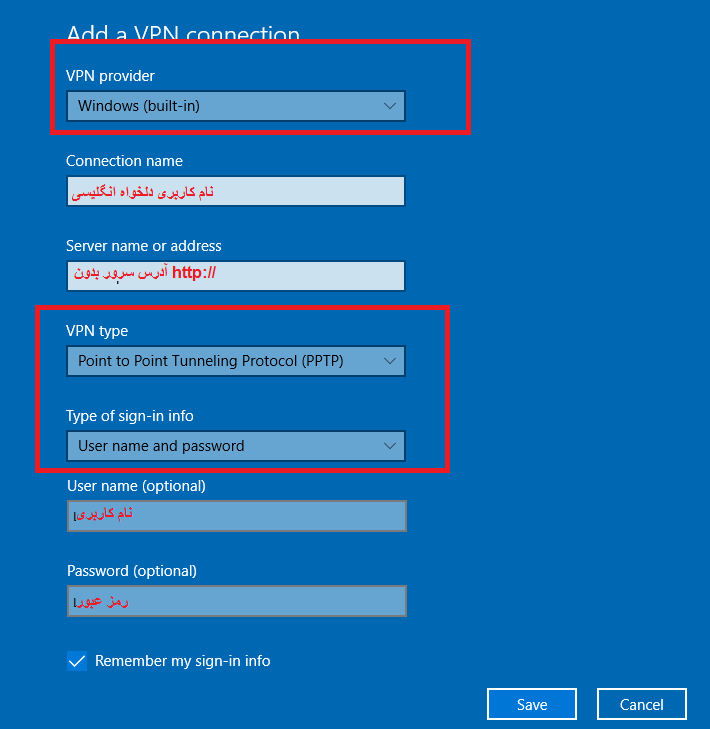
ذخیره را بزنید و با کانکشن ساخته شده متصل شوید

]]>
https://new.ipeiran.com/pptp-connection-windows/feed/ 0
اتصال sstp ویندوز https://new.ipeiran.com/sstp-connection-windows/ https://new.ipeiran.com/sstp-connection-windows/#respond Mon, 12 Jun 2023 21:32:54 +0000 http://new.ipeiran.com/?p=1880 /*! elementor - v3.13.3 - 28-05-2023 */ .elementor-heading-title{padding:0;margin:0;line-height:1}.elementor-widget-heading .elementor-heading-title[class*=elementor-size-]>a{color:inherit;font-size:inherit;line-height:inherit}.elementor-widget-heading .elementor-heading-title.elementor-size-small{font-size:15px}.elementor-widget-heading .elementor-heading-title.elementor-size-medium{font-size:19px}.elementor-widget-heading .elementor-heading-title.elementor-size-large{font-size:29px}.elementor-widget-heading .elementor-heading-title.elementor-size-xl{font-size:39px}.elementor-widget-heading .elementor-heading-title.elementor-size-xxl{font-size:59px}

اتصال ویندوز از طریق sstp

برای ساخت کانکشن sstp در ویندوز ابتدا رو گزینه نتورک پایین صفحه را بزنید گزینه نتورک ستینگ رو بزنید

گزینه وی پی ان و بعد اضافه کردن رو بزنید
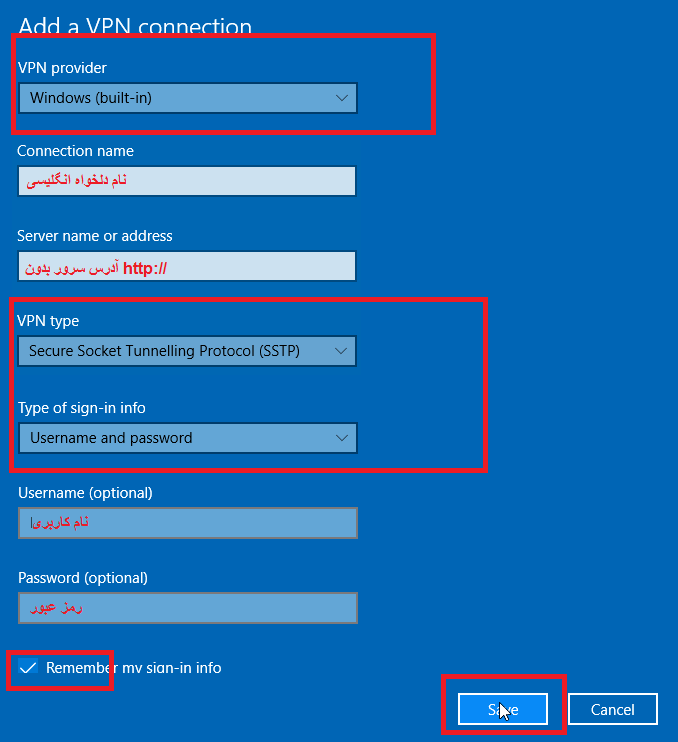

ذخیره را بزنید و با کانکشن ساخته شده متصل شوید

]]>
https://new.ipeiran.com/sstp-connection-windows/feed/ 0
اتصال L2TP ویندوز https://new.ipeiran.com/l2tp-for-windows/ https://new.ipeiran.com/l2tp-for-windows/#respond Mon, 12 Jun 2023 19:22:43 +0000 http://new.ipeiran.com/?p=1868 /*! elementor - v3.13.3 - 28-05-2023 */
.elementor-heading-title{padding:0;margin:0;line-height:1}.elementor-widget-heading .elementor-heading-title[class*=elementor-size-]>a{color:inherit;font-size:inherit;line-height:inherit}.elementor-widget-heading .elementor-heading-title.elementor-size-small{font-size:15px}.elementor-widget-heading .elementor-heading-title.elementor-size-medium{font-size:19px}.elementor-widget-heading .elementor-heading-title.elementor-size-large{font-size:29px}.elementor-widget-heading .elementor-heading-title.elementor-size-xl{font-size:39px}.elementor-widget-heading .elementor-heading-title.elementor-size-xxl{font-size:59px}

اتصال ویندوز از طریق L2TP

برای ساخت کانکشن l2tp در ویندوز ابتدا رو گزینه نتورک پایین صفحه را بزنید گزینه نتورک ستینگ رو بزنید

گزینه وی پی ان و بعد اضافه کردن رو بزنید
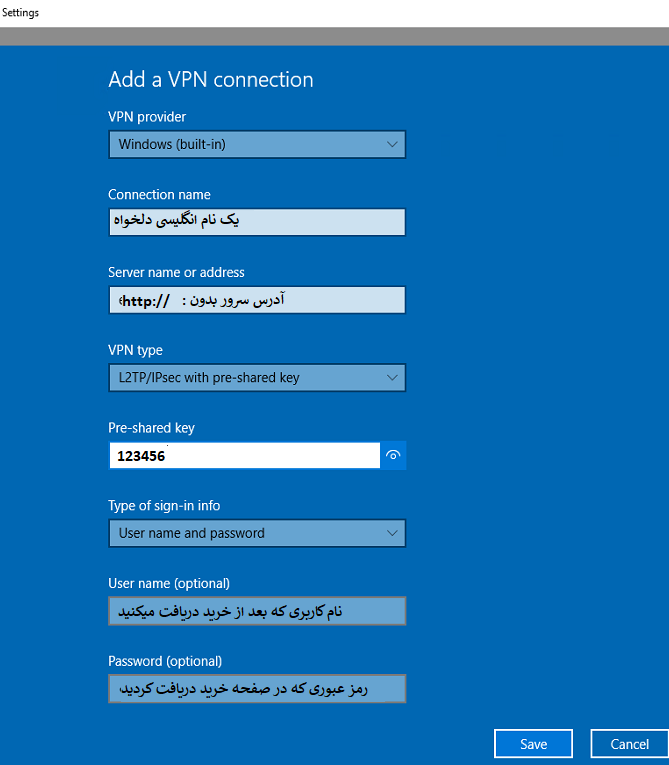

اطلاعات l2tp

ذخیره را بزنید و با کانکشن ساخته شده متصل شوید

]]>
https://new.ipeiran.com/l2tp-for-windows/feed/ 0
اتصال IKEV2 ویندوز https://new.ipeiran.com/connection-ikev2-windows/ https://new.ipeiran.com/connection-ikev2-windows/#respond Wed, 31 May 2023 23:54:44 +0000 http://new.ipeiran.com/?p=1647 /*! elementor - v3.13.3 - 28-05-2023 */ .elementor-heading-title{padding:0;margin:0;line-height:1}.elementor-widget-heading .elementor-heading-title[class*=elementor-size-]>a{color:inherit;font-size:inherit;line-height:inherit}.elementor-widget-heading .elementor-heading-title.elementor-size-small{font-size:15px}.elementor-widget-heading .elementor-heading-title.elementor-size-medium{font-size:19px}.elementor-widget-heading .elementor-heading-title.elementor-size-large{font-size:29px}.elementor-widget-heading .elementor-heading-title.elementor-size-xl{font-size:39px}.elementor-widget-heading .elementor-heading-title.elementor-size-xxl{font-size:59px}

اتصال ویندوز از طریق IKEV2

برای ساخت کانکشن IKEV2 در ویندوز ابتدا رو گزینه نتورک پایین صفحه را بزنید گزینه نتورک ستینگ رو بزنید

گزینه وی پی ان و بعد اضافه کردن رو بزنید
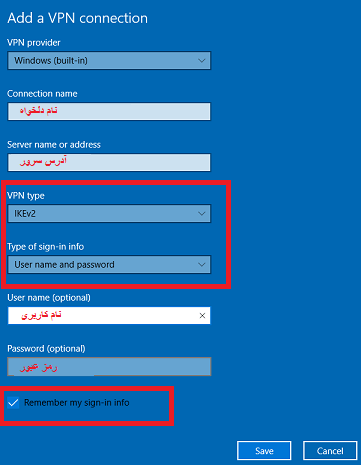

ذخیره را بزنید و با کانکشن ساخته شده متصل شوید

]]>
https://new.ipeiran.com/connection-ikev2-windows/feed/ 0